

Common issues
Build didn’t create what I expected
Problem: The app looks different from what you described. Solutions:- Be more specific - Add detail to your prompt
- Break it down - Build in smaller steps
- Clarify fields - List exact field names and types
Example: Before and after
Example: Before and after
Before (vague):After (specific):
Data isn’t saving
Problem: You fill out a form but the data disappears. Solutions:- Check required fields - Make sure all required fields are filled
- Describe the issue - Tell Gainable: “The deal form isn’t saving. The data disappears after I click save.”
- Reload and retry - Refresh the page and try again
Changes not appearing for other users
Problem: Real-time updates aren’t working. Solutions:- Check internet connection - Ensure you’re online
- Refresh the page - Sometimes connections need to reconnect
- Same view? - Make sure other users are viewing the same page
Chart showing wrong data
Problem: The chart doesn’t match your expectations. Solutions:- Specify the grouping - “Group by status” vs “group by month”
- Name the date field - “Use close date for the timeline”
- Request a change - “The chart should show deals by status, not by company”
Example: Fixing a chart
Example: Fixing a chart
Kanban cards not dragging
Problem: Cards won’t move between columns. Solutions:- Refresh the page - Reload to reinitialize
- Check console - Open browser dev tools for error messages
- Report the issue - “Cards on the kanban board aren’t dragging”
Filter not working
Problem: Filter selections don’t change the displayed data. Solutions:- Clear and reselect - Reset the filter and try again
- Check the field - Make sure items have values in the filtered field
- Describe the issue - “The status filter on the deals page isn’t filtering”
Requesting fixes
How you phrase a fix decides how fast it lands — say what you saw and what you expected, and say whether it is a defect or a change of mind.Changing a built app
Reporting a bug precisely, and why a preference reported as a bug costs so much longer.
Getting help
Describe the issue clearly
Include:- What you were trying to do
- What happened instead
- Any error messages you saw
- Steps to reproduce
Example help request
Browser issues
Clear cache and cookies
Sometimes browser data causes issues:- Open browser settings
- Find “Clear browsing data”
- Select “Cookies” and “Cached images/files”
- Clear for the Gainable site
Try a different browser
If issues persist, try:- Chrome
- Firefox
- Safari
- Edge
Disable extensions
Browser extensions can interfere. Try:- Disable ad blockers temporarily
- Disable other extensions
- Try incognito/private mode
Performance issues
Slow loading
If your app feels slow:- Check your data volume - Very large datasets may load slowly
- Add pagination - “Paginate the deals list with 25 items per page”
- Add filters - Filter to show fewer items at once
Charts loading slowly
For charts with lots of data:- Limit the data - “Show last 12 months only”
- Aggregate - “Group by month instead of by day”
- Simplify - Reduce the number of charts on one page
Audit codebase
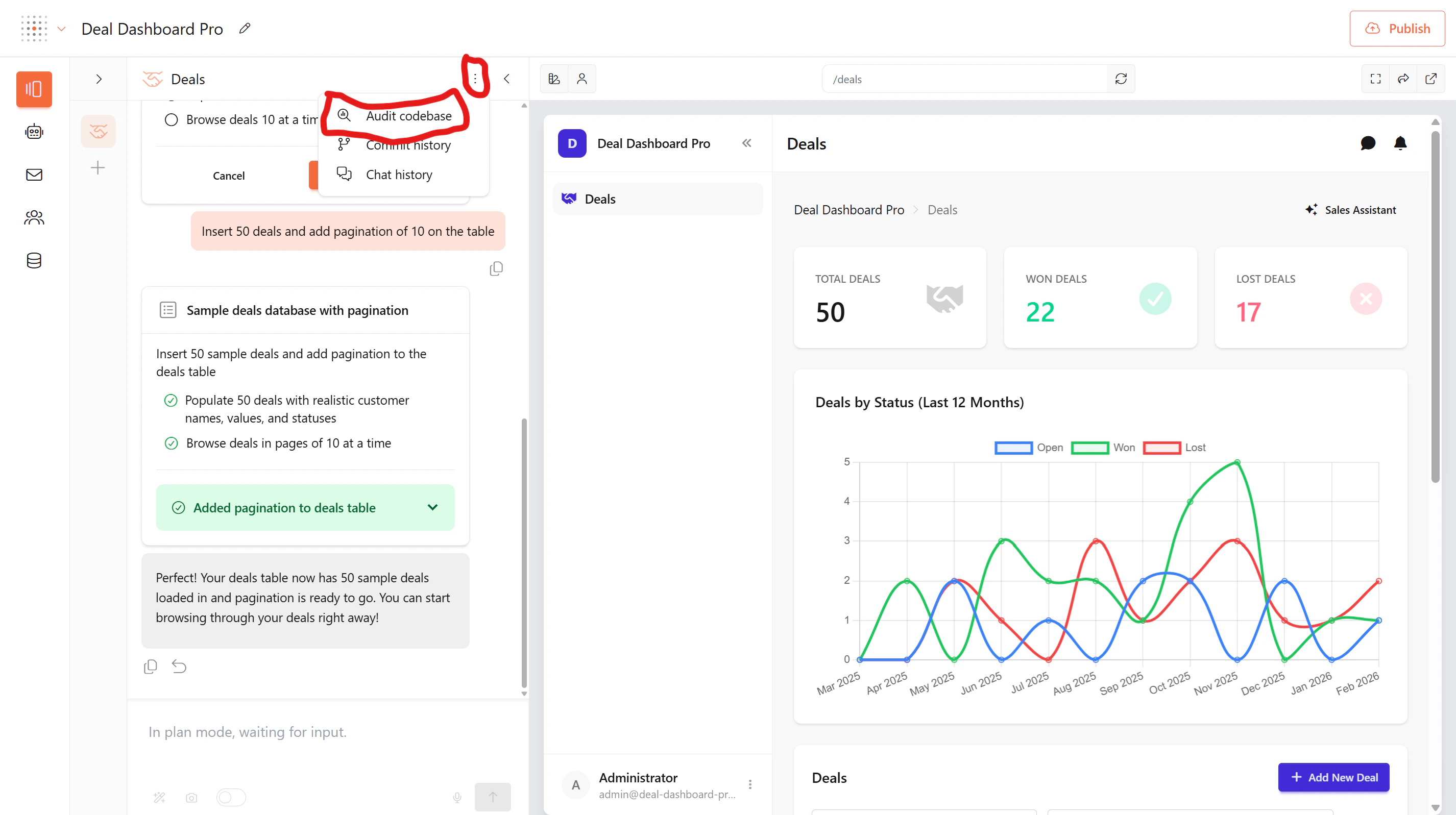
When something is stuck or behaving unexpectedly, you can run an automatic audit that analyzes your entire codebase to identify issues.How to run an audit
- Open the Pages panel on the left side of the builder
- Click the three-dot menu (⋮) at the top of the panel
- Select Audit codebase
Still stuck?
If you’ve tried the above and still have issues, reach out to our support team. You can get help two ways:Live chat support
Click the chat icon in the bottom-left corner of the builder. This is available on any screen — whether you’re working with Pages, Agents, Mail, Users, Collections, or managing Datasets, Data models, and Connectors. You’ll be connected to our support team instantly, right inside the app.Email support
You can also email us at support@gainable.dev for non-urgent issues or longer requests.Tips for faster resolution
When reaching out, include:- What you were trying to do
- What happened instead
- Any error messages you saw
- Your chat history — this helps our team track down issues much faster
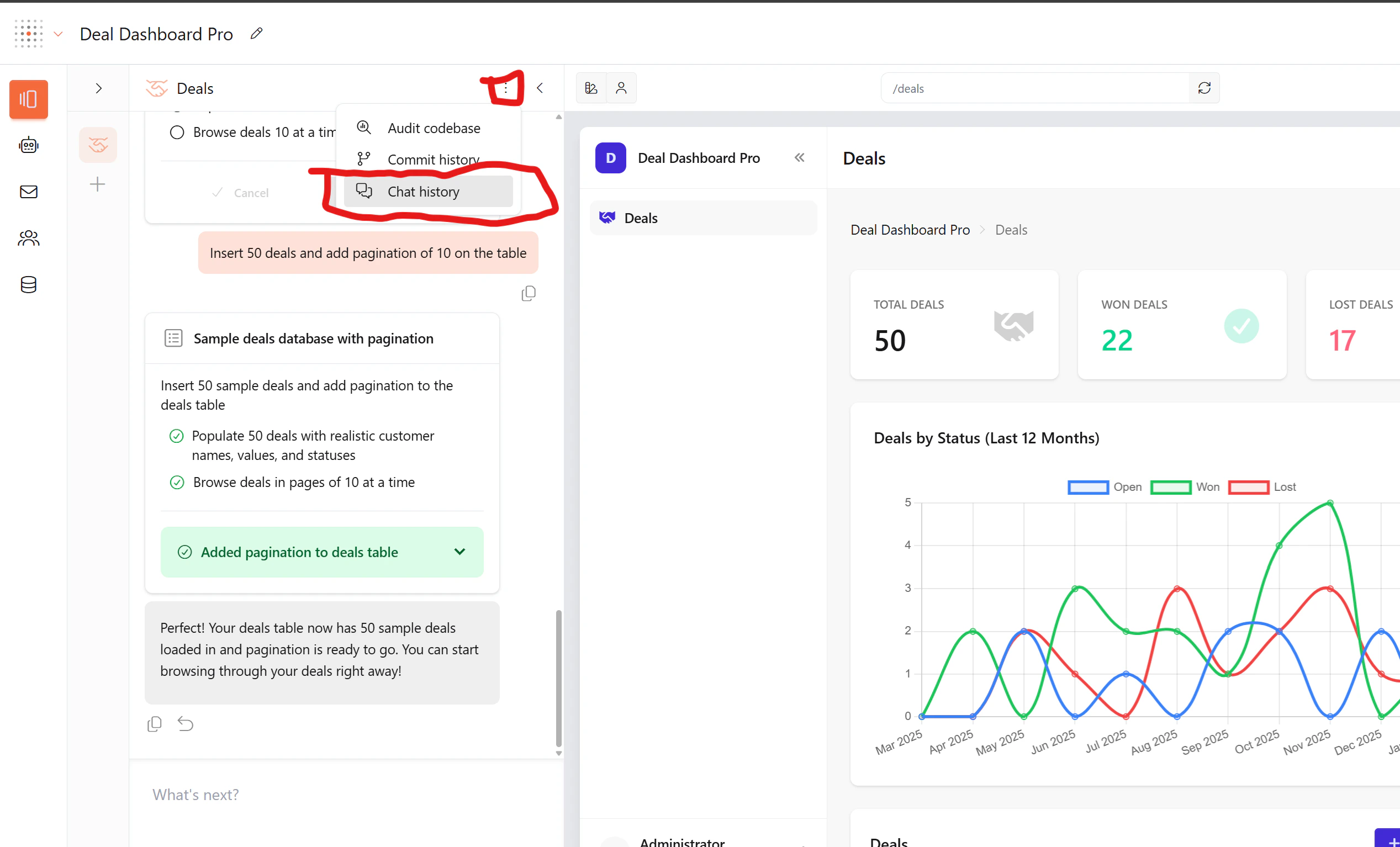
How to export chat history
Your chat history contains the full conversation with the build agent, including what you asked for and what was built. To export it:- Click the three-dot menu (⋮) at the top of the Pages panel
- Select Chat history
Live chat
Open the builder and click the chat icon in the bottom-left corner
Email support
Email us at support@gainable.dev