

Two paths to your app
Gainable uses specialized build agents that work together to create your application. The agents involved depend on how you start:Describe your app
Write what you want in plain English. The Planner Agent creates a build plan, the Build Agent generates code, and the Validation Agent ensures quality.
Build from data
Connect external data sources. The DataAnalyzer Agent examines your schema, recommends features through interactive Q&A, and produces a build specification.
Path 1: Describe your app
1
You describe your app
Write what you want in plain English. Be as specific or general as you like.
2
Planner Agent analyzes your request
The Planner understands your intent, identifies what data you need, and creates a structured build plan.
3
Build Agent generates code
The Build Agent creates your complete application: database models, user interface, and all the logic.
4
Validation ensures quality
Before delivering your app, validation checks catch common issues and ensure everything works.
5
Your app is ready
A fully functional application is ready to use immediately.
Path 2: Build from data
1
Connect and sync your data
Choose a data source (Google Sheets, HubSpot, Stripe, etc.), authenticate, and sync your data into Gainable.
2
DataAnalyzer Agent examines your schema
The agent analyzes your field names, types, sample rows, and enum values. It identifies the domain (CRM, project management, finance, etc.) and detects patterns like pipeline stages, currency fields, or contact records.
3
Interactive refinement
The agent asks 2-3 clarifying questions through multiple-choice options. You shape the app spec through conversation.
4
Build Agent generates code
The same Build Agent used in the prompt path executes the spec, creating views, dashboards, and collaboration features matched to your data.
5
Validation ensures quality
Validation checks run to catch common issues before delivery.
6
Your app is ready
A fully functional application appears, pre-populated with your synced data.
What makes this different?
Gainable creates complete, production-ready applications, not code snippets:The agent system
Gainable uses multiple build agents, each specialized for a specific task:Planner Agent
Analyzes your request and creates a detailed build plan. Identifies data models, views, and features needed.
Build Agent
Generates the code for your application. Creates database models, routes, and user interfaces.
DataAnalyzer Agent
Examines synced data schemas and sample data. Identifies the domain, recommends features, and produces a build specification through interactive conversation. Used in the “Build from data” path.
Validation Agent
Checks generated code for common issues and ensures it follows best practices.
Conversation Agent
Answers questions about your project and helps you understand what was built.
Beyond building: Gaia inside your apps
The agents above (Planner, Build, Validation, Conversation) work behind the scenes to build your app. Once it’s live, two more pieces of Gaia run inside it:- Gaia Copilot. The conversational layer. The user asks; the Copilot answers. It reads live app data and references uploaded knowledge.
- Gaia Autopilot. The autonomous layer. They watch data against inferred objectives, draft work, and land it in Autopilot for approval.
Gaia Copilot
The conversational layer for “the user asks, the Copilot answers”
Gaia Autopilot
The proactive layer for “work shows up before anyone asks”
What happens when you send a prompt
Let’s follow a real example through the system:Example: 'Build a task tracker with due dates and priorities'
Example: 'Build a task tracker with due dates and priorities'
1. Planner Agent receives your requestThe Planner identifies:3. Build Agent generates codeThe Build Agent creates:
- You need a Task data model
- Fields: title, description, due date, priority
- You’ll need a view to manage tasks
- CRUD operations (create, read, update, delete)
- Database model for Task
- API routes for CRUD operations
- A task list view with forms
- Priority badges and date formatting
- All fields are properly connected
- Forms save data correctly
- The interface works on mobile
Example: Building from a Google Sheet of sales deals
Example: Building from a Google Sheet of sales deals
1. You connect and sync your Google SheetThe sheet has columns: Deal Name, Company, Amount, Stage (New, Qualified, Proposal, Won, Lost), Close Date, Owner.2. DataAnalyzer Agent analyzes the schemaThe agent identifies:
- Domain: CRM / Sales (deal + amount + stage enum)
- Pipeline enum: Stage with 5 values → kanban board
- Currency field: Amount → KPI cards and charts
- Date field: Close Date → timeline filtering
- A kanban board with deals grouped by stage
- A dashboard with pipeline value KPIs and charts by stage
- A searchable deal table
- Comments on individual deals
- An AI copilot configured for sales questions
How iteration works
Gainable remembers everything about your project. When you ask for changes:- Context is preserved - The AI knows what’s already built
- Existing features are protected - New additions don’t break what works
- Changes are targeted - Only the relevant parts are modified
- Every change is versioned - Each successful build creates a snapshot you can revert to
Undo this build
Not happy with the latest change? Click the undo button (↩) on any build completion message to revert it instantly.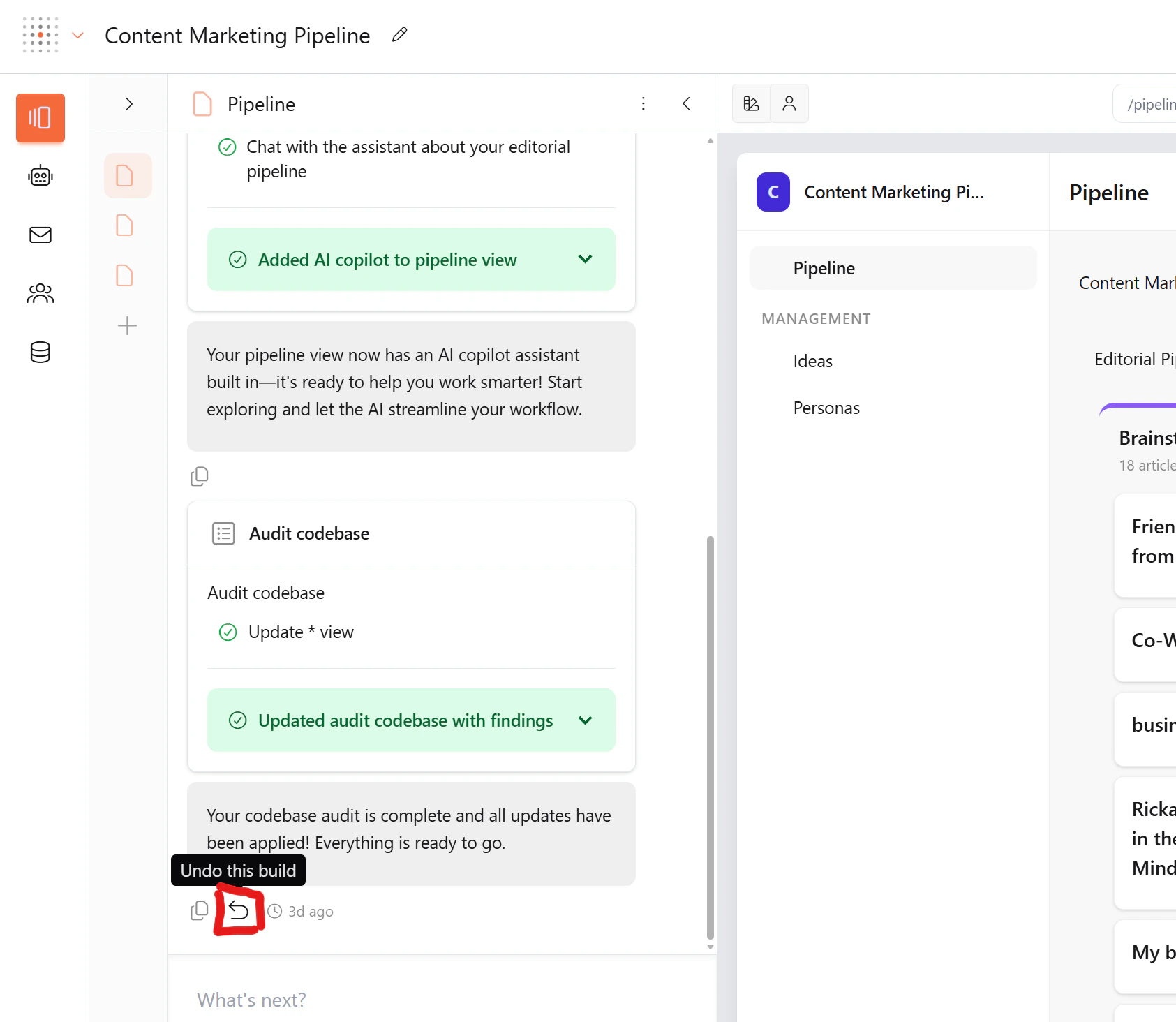
- Everything from that step is reverted — code, views, data models, routes
- You can only undo one step at a time — this prevents cascading issues and keeps your app stable
- Your previous state is fully restored — as if the build never happened
You can only undo the most recent build. To go further back, use Commit history.
Commit history
Every build creates a versioned commit with a description of what changed. You can view and rollback to any point in your build history.- Click the three-dot menu (⋮) at the top of the Pages panel
- Select Commit history
How rollback safety works
How rollback safety works
When you rollback, Gainable automatically creates a safety snapshot of your current state before reverting. This means you can undo a rollback if you change your mind — just open Commit history again and click Undo to restore the state before the rollback.
Technical foundation
Every Gainable app is built on a proven tech stack:You don’t need to know any of these technologies to use Gainable. This is just what powers your apps behind the scenes.
Learn more
Meet the build agents
Deep dive into the agents that build your app
Build from data
Connect external data sources and let Gainable design your app
Explore skills
Discover built-in features you can request
Gaia Copilot
Add a conversational assistant to your app
Gaia Autopilot
Add autonomous agents that draft work in the background