> ## Documentation Index
> Fetch the complete documentation index at: https://docs.gainable.dev/llms.txt
> Use this file to discover all available pages before exploring further.
# How it works
> Understand how Gainable turns your ideas into working apps
## Two paths to your app
Gainable uses specialized build agents that work together to create your application. The agents involved depend on how you start:
Write what you want in plain English. The Planner Agent creates a build plan, the Build Agent generates code, and the Validation Agent ensures quality.
Connect external data sources. The DataAnalyzer Agent examines your schema, recommends features through interactive Q\&A, and produces a build specification.
Both paths converge at the Build Agent, which generates your complete application.
### Path 1: Describe your app
Write what you want in plain English. Be as specific or general as you like.
The Planner understands your intent, identifies what data you need, and creates a structured build plan.
The Build Agent creates your complete application: database models, user interface, and all the logic.
Before delivering your app, validation checks catch common issues and ensure everything works.
A fully functional application is ready to use immediately.
### Path 2: Build from data
Choose a data source (Google Sheets, HubSpot, Stripe, etc.), authenticate, and sync your data into Gainable.
The agent analyzes your field names, types, sample rows, and enum values. It identifies the domain (CRM, project management, finance, etc.) and detects patterns like pipeline stages, currency fields, or contact records.
The agent asks 2-3 clarifying questions through multiple-choice options. You shape the app spec through conversation.
The same Build Agent used in the prompt path executes the spec, creating views, dashboards, and collaboration features matched to your data.
Validation checks run to catch common issues before delivery.
A fully functional application appears, pre-populated with your synced data.
## What makes this different?
Gainable creates **complete, production-ready applications**, not code snippets:
| Traditional AI Code | Gainable |
| ----------------------- | -------------------------------------- |
| Generates code snippets | Generates complete apps |
| You assemble the pieces | Everything is connected |
| Basic text completion | Specialized agents with deep expertise |
| Generic output | Follows proven patterns |
## The agent system
Gainable uses multiple build agents, each specialized for a specific task:
Analyzes your request and creates a detailed build plan. Identifies data models, views, and features needed.
Generates the code for your application. Creates database models, routes, and user interfaces.
Examines synced data schemas and sample data. Identifies the domain, recommends features, and produces a build specification through interactive conversation. Used in the "Build from data" path.
Checks generated code for common issues and ensures it follows best practices.
Answers questions about your project and helps you understand what was built.
## Beyond building: Gaia inside your apps
The agents above (Planner, Build, Validation, Conversation) work behind the scenes to *build* your app. Once it's live, two more pieces of Gaia run inside it:
* **Gaia Copilot.** The conversational layer. The user asks; the Copilot answers. It reads live app data and references uploaded knowledge.
* **Gaia Autopilot.** The autonomous layer. They watch data against inferred objectives, draft work, and land it in [Autopilot](/autopilot/inbox) for approval.
The two are designed to live side by side. Copilot is reactive. Agents are proactive.
The conversational layer for "the user asks, the Copilot answers"
The proactive layer for "work shows up before anyone asks"
## What happens when you send a prompt
Let's follow a real example through the system:
**1. Planner Agent receives your request**
The Planner identifies:
* You need a Task data model
* Fields: title, description, due date, priority
* You'll need a view to manage tasks
* CRUD operations (create, read, update, delete)
**2. Plan is created**
```
Summary: Build task tracker with due dates and priority levels
Features:
- Task management (add, edit, delete tasks)
- Due date tracking
- Priority levels (low, medium, high)
- Task list view
Data model:
- Task: title, description, dueDate, priority, completed
```
**3. Build Agent generates code**
The Build Agent creates:
* Database model for Task
* API routes for CRUD operations
* A task list view with forms
* Priority badges and date formatting
**4. Validation runs**
Checks ensure:
* All fields are properly connected
* Forms save data correctly
* The interface works on mobile
**5. Your app is ready**
You now have a working task tracker you can use immediately.
**1. You connect and sync your Google Sheet**
The sheet has columns: Deal Name, Company, Amount, Stage (New, Qualified, Proposal, Won, Lost), Close Date, Owner.
**2. DataAnalyzer Agent analyzes the schema**
The agent identifies:
* Domain: CRM / Sales (deal + amount + stage enum)
* Pipeline enum: Stage with 5 values → kanban board
* Currency field: Amount → KPI cards and charts
* Date field: Close Date → timeline filtering
**3. Agent asks clarifying questions**
"I see a sales pipeline with 5 stages and deal values. What should be the primary view?"
Options: Pipeline Board / Revenue Dashboard / Deal Table
**4. You refine through Q\&A**
You pick "Pipeline Board" as the primary view. The agent asks one more question about how to handle the Owner field.
**5. Build Agent generates the app**
The Build Agent creates:
* A kanban board with deals grouped by stage
* A dashboard with pipeline value KPIs and charts by stage
* A searchable deal table
* Comments on individual deals
* An AI copilot configured for sales questions
**6. Your app is ready**
Pre-populated with all your Google Sheet data, ready to use immediately.
## How iteration works
Gainable remembers everything about your project. When you ask for changes:
1. **Context is preserved** - The AI knows what's already built
2. **Existing features are protected** - New additions don't break what works
3. **Changes are targeted** - Only the relevant parts are modified
4. **Every change is versioned** - Each successful build creates a snapshot you can revert to
This means you can build incrementally and experiment freely. Start with something simple, add features one at a time, and undo anything that doesn't work out.
### Undo this build
Not happy with the latest change? Click the **undo button** (↩) on any build completion message to revert it instantly.
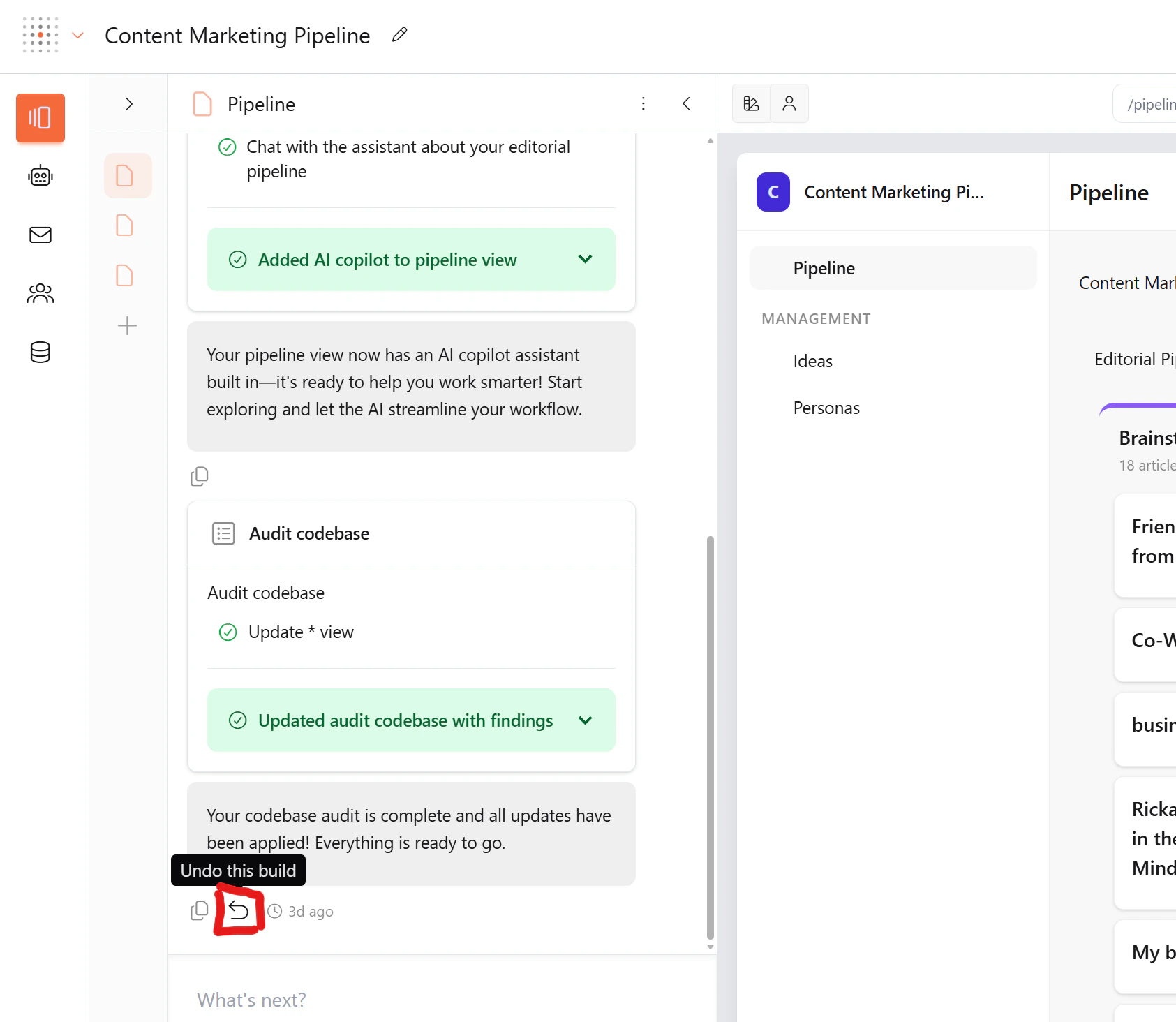 When you undo a build:
* **Everything from that step is reverted** — code, views, data models, routes
* **You can only undo one step at a time** — this prevents cascading issues and keeps your app stable
* **Your previous state is fully restored** — as if the build never happened
You can only undo the most recent build. To go further back, use Commit history.
### Commit history
Every build creates a versioned commit with a description of what changed. You can view and rollback to any point in your build history.
1. Click the **three-dot menu** (⋮) at the top of the Pages panel
2. Select **Commit history**
The history shows all your builds with descriptions and timestamps. Click **Rollback** on any previous entry to restore your app to that point.
When you rollback, Gainable automatically creates a safety snapshot of your current state before reverting. This means you can **undo a rollback** if you change your mind — just open Commit history again and click **Undo** to restore the state before the rollback.
## Technical foundation
Every Gainable app is built on a proven tech stack:
| Layer | Technology | What it does |
| ----------------- | ------------------ | --------------------------------------------- |
| **Database** | MongoDB | Stores all your data flexibly |
| **Backend** | Node.js + Express | Handles data operations |
| **Frontend** | Modern HTML/CSS/JS | Responsive interface that works on any device |
| **Real-time** | Socket.IO | Instant updates across users |
| **UI Components** | DaisyUI + Tailwind | Polished, themeable design |
| **Collaboration** | Weavy | Chat, files, and comments |
You don't need to know any of these technologies to use Gainable. This is just what powers your apps behind the scenes.
## Learn more
Deep dive into the agents that build your app
Connect external data sources and let Gainable design your app
Discover built-in features you can request
Add a conversational assistant to your app
Add autonomous agents that draft work in the background
When you undo a build:
* **Everything from that step is reverted** — code, views, data models, routes
* **You can only undo one step at a time** — this prevents cascading issues and keeps your app stable
* **Your previous state is fully restored** — as if the build never happened
You can only undo the most recent build. To go further back, use Commit history.
### Commit history
Every build creates a versioned commit with a description of what changed. You can view and rollback to any point in your build history.
1. Click the **three-dot menu** (⋮) at the top of the Pages panel
2. Select **Commit history**
The history shows all your builds with descriptions and timestamps. Click **Rollback** on any previous entry to restore your app to that point.
When you rollback, Gainable automatically creates a safety snapshot of your current state before reverting. This means you can **undo a rollback** if you change your mind — just open Commit history again and click **Undo** to restore the state before the rollback.
## Technical foundation
Every Gainable app is built on a proven tech stack:
| Layer | Technology | What it does |
| ----------------- | ------------------ | --------------------------------------------- |
| **Database** | MongoDB | Stores all your data flexibly |
| **Backend** | Node.js + Express | Handles data operations |
| **Frontend** | Modern HTML/CSS/JS | Responsive interface that works on any device |
| **Real-time** | Socket.IO | Instant updates across users |
| **UI Components** | DaisyUI + Tailwind | Polished, themeable design |
| **Collaboration** | Weavy | Chat, files, and comments |
You don't need to know any of these technologies to use Gainable. This is just what powers your apps behind the scenes.
## Learn more
Deep dive into the agents that build your app
Connect external data sources and let Gainable design your app
Discover built-in features you can request
Add a conversational assistant to your app
Add autonomous agents that draft work in the background